If you ask ten different people to define the dark web, you’ll receive ten different answers, most of them taken from crime films. In these films there’s a hooded person, a green terminal and a secret basement of the internet where anything can be bought, provided you have the right amount of Bitcoin.
The actual situation is stranger in some respects and considerably duller in others. The BBC has a website on the dark web, as do the Tor Project, Proton, DuckDuckGo and numerous newsrooms that want their sources to be able to reach them safely. The same network also contains drug markets, stolen logins and more scams than any honest person could possibly count.
When we first began reading about this topic, we wanted a guide like this one. All we could find was sensational clickbait or dense academic papers. This guide explains what the dark web is, how it works, who is on it, whether it is legal, what actually goes wrong for people, and which common beliefs fall apart when tested against the evidence. It contains no market links and never will. It’s just the map.
What the dark web is, and what it isn’t
The dark web consists of websites and services that are accessible only through an anonymity network. In reality, when people refer to “the dark web” they generally mean websites running on Tor, which are known as onion services and have addresses ending in .onion. Smaller networks like I2P also have their own hidden sites, which we discuss in What Is a Darknet?.
Three things distinguish a dark web site from a normal one.
- You need special software to open it. Chrome, Safari and Edge can’t load an .onion address on their own. You need Tor Browser or another program that uses the Tor protocol.
- The address isn’t a name. A typical website has a domain name you can remember, for example bbc.co.uk. An onion address is a string of 56 random-looking letters and numbers followed by .onion. It is derived from the site’s cryptographic key, not purchased from a registrar.
- The server’s location is concealed. No one, not you, not the network and not the government of the country where the server sits, can easily determine where the site is physically hosted or who is paying for it.
That is precisely why the dark web exists. Hiding a website’s location protects a whistleblowing platform from the people it is exposing. It also helps a drug market avoid the police. The technology doesn’t care which one it is serving.
Why “dark”?
The term has no connection with morality. It refers to visibility, just as a “dark” house is one where no one is home, or “dark fibre” is cable that has been laid but not lit. In the 1970s, network engineers applied the term “darknets” to parts of ARPANET (the precursor to the internet) because those sections had been deliberately cut off and did not respond when pinged. In 2002, four Microsoft researchers published a paper titled The Darknet and the Future of Content Distribution, which used the term for private file-sharing networks, and from then on it came into wider use (background on Wikipedia). “Dark web” followed in the 2000s, mainly through journalism. The complete story of these terms is in Darkweb, Dark Web or Darknet?.
What it isn’t
Once you know what the dark web is not, a great deal of confusion disappears.
It isn’t the deep web. The deep web includes everything search engines don’t index, such as your Gmail inbox, your bank account, your company’s HR system and a paywalled newspaper archive. It is vast and almost entirely ordinary. The dark web is only a small, separate part of it. For an explanation of the difference, see What Is the Deep Web?.
It isn’t one place. There is no front door, no main directory and no homepage. Websites constantly appear, move and disappear, and no one has a full list. (Pages claiming to be “the official” directory are a problem in themselves, which we deal with in The Hidden Wiki Explained.)
It isn’t illegal in itself. In most countries it is legal to visit. Some of the activities carried out on it are not.
It isn’t very large. Compared with the regular web, the dark web is a small town. Tor’s own statistics have long indicated that traffic to onion sites accounts for only a few per cent of all traffic on the Tor network. Most people who use Tor use it to access ordinary websites privately, not to visit .onion addresses at all.
Surface web vs deep web vs dark web
The three terms are confused all the time, even in news stories that should know better. Here is how they compare.
| Surface web | Deep web | Dark web | |
|---|---|---|---|
| What it is | Public pages search engines can find | Anything search engines can’t index | Sites only reachable through Tor or similar networks |
| How you reach it | Any browser | Any browser, plus a login, paywall or direct link | Tor Browser or similar software |
| Shows up on Google? | Yes | No | No |
| Typical address | wikipedia.org | mail.google.com (after login) | 56 characters + .onion |
| Everyday examples | News sites, Wikipedia, shops | Email, online banking, medical portals, cloud drives | Newsroom mirrors, whistleblowing drop boxes, privacy-focused email, markets |
| Server location visible? | Yes | Yes | No |
| Legal to use? | Yes | Yes | Yes in most countries; depends on what you do |
| Relative size | Large | By far the largest | Very small |
Two points tend to confuse people.
First, since search engines do not index onion services, every dark web site is technically part of the deep web. The reverse is not true, though. Almost none of the deep web is part of the dark web. Your inbox isn’t protected by Tor. It’s protected by a password.
Second, you don’t go to the deep web. You use it each time you check your bank balance. That’s why the well-known iceberg diagram, with the surface web as the tip and the dark web as a threatening mass beneath the water, is so misleading. It implies that the dark web is the largest part of the internet, when in fact it is the smallest. For a clearer illustration, see Deep Web vs Dark Web: The Difference in One Diagram.
How it works (onion routing in one picture)
Tor stands for The Onion Router, and the onion is a very good metaphor once you look at it.
Suppose you want to send a letter so that the post office never learns both who sent it and who it is for. You place the letter in an envelope addressed to the final recipient. You put that envelope into a second one addressed to a stranger named Carol. That goes into a third, addressed to Bob, and then a fourth, addressed to Alice. Finally, you give the whole bundle to Alice.
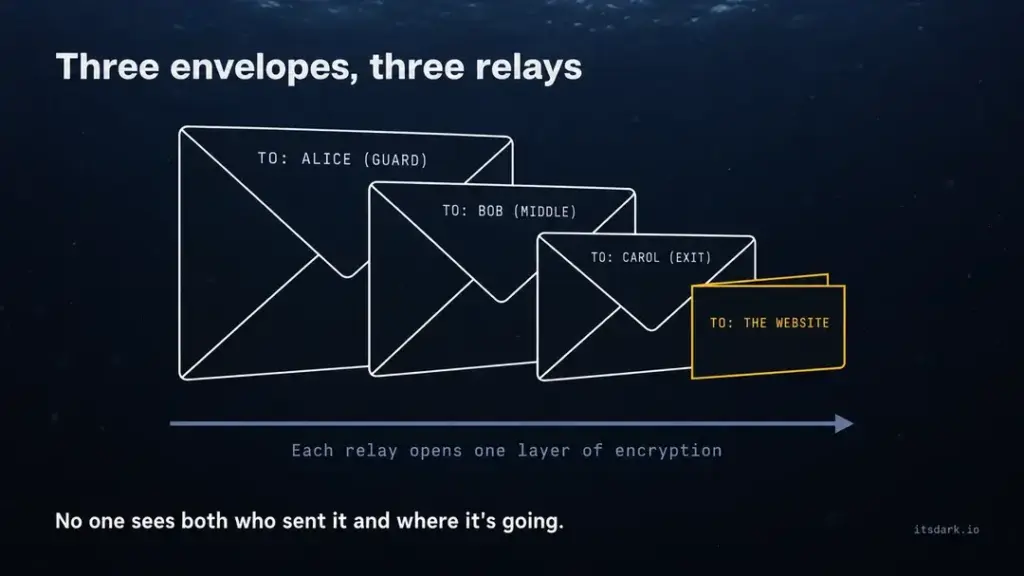
When Alice opens her envelope, she finds one addressed to Bob. She has no idea what is inside or where it ends up. Bob opens his and finds one for Carol. He does not know who started the chain. Carol opens hers and posts the letter. She knows where it is going but has no idea who wrote it.
That’s Tor, more or less. Each envelope is a layer of encryption. Alice, Bob and Carol are relays, computers run by volunteers all over the world. According to Tor Metrics, the Tor Project’s public statistics site, there have been somewhere over 9,000 running relays on an average day through 2026.
When you open Tor Browser, it builds a path called a circuit through three of them.
- The guard (entry) relay knows your IP address but not your destination.
- The middle relay knows neither who you are nor where you’re going. It just passes traffic between the other two.
- The exit relay knows the destination but not who you are.
No single relay holds both halves of the puzzle. That is the fundamental trick, and it has stayed the same since the idea was developed at the US Naval Research Laboratory in the mid-1990s (Tor’s history).
Where onion sites come in
Everything above is about concealing you while you use a normal website. Onion services go one step further and hide the website as well.
An onion site has no exit relay at all. Instead, it selects a few relays to act as its introduction points and publishes a signed note explaining how to reach it. When you type its .onion address, Tor Browser looks up that note, chooses a separate relay as the rendezvous point, and asks the site to meet you there. You and the site then each build your own three-relay circuit to that meeting place.
The result is a connection that passes through six relays, and at no point does either side learn the other’s IP address. The site doesn’t know who you are, you don’t know where the site is, and none of the relays in between know either. The Tor Project walks through the steps in How onion services work.
The address is part of the security, too. A modern (v3) onion address is derived from the site’s public key, which means it is self-authenticating. If you have the correct address, you are talking to the right server. Certificate authorities play no part in this. On the other hand, changing just one character sends you somewhere completely different, which is exactly how phishing clones work. The older, 16-character v2 addresses were switched off in October 2021, and we discuss what that broke in V2 vs V3 Onion Addresses.
What onion routing doesn’t do
Tor conceals where your traffic comes from, but it doesn’t hide what you say. If you log into your personal email account through Tor, your email provider knows it’s you. If you enter your real name in a form, the website has your real name. And if you download a document and open it while online, it can phone home outside Tor. Most real-world de-anonymisation comes from mistakes like these rather than from anyone breaking the encryption. There is a five-stage walkthrough, with diagrams, in How the Dark Web Works.
IMAGE NOTE. Place an original diagram here. On the left, “You” goes to the Guard, then the Middle, then the Exit, and finally the “Normal website”. On the right, “You” passes through three relays to the Rendezvous point, which connects back through three relays to the “Onion site”. Alt text, “How the dark web works, a Tor circuit to a normal site compared with a six-relay connection to an onion site.”
Who uses it, and why
Tor Metrics estimates that about three million people connect to Tor directly on a typical day, plus a couple of hundred thousand more who use bridges, the hidden entry points needed where Tor is blocked. These are estimates, not exact figures. Since Tor is designed not to track individual users, the numbers are calculated from how often clients request the network’s list of relays.
The more interesting question is who these people are. No one can give an exact answer, because the entire system is built so that no one can. However, the public evidence suggests a mix that is entirely unlike the movie version.
People living under censorship. Tor use rises when governments shut down or filter the internet. You can see this in the Tor Metrics graphs for Iran, where the project’s own events log notes an internet shutdown that began in late February 2026, and for Russia, where Tor directory servers and bridges were blocked by some ISPs from December 2021. For many people in those countries, Tor is simply how they read the news.
Journalists and their sources. SecureDrop, an open-source whistleblowing system looked after by the Freedom of the Press Foundation, runs as an onion service. Many news organisations use it so that sources can hand over documents without leaving an IP address behind. Major news outlets have also set up onion versions of their own websites. ProPublica did so in 2016, The New York Times in 2017 (it closed its onion site in March 2025) and the BBC in 2019, mainly so that readers in countries where they are blocked can still reach them.
Ordinary people who care about privacy. Facebook introduced an onion address in 2014, and two years later the company said over a million people were reaching Facebook over Tor in a single month. Most of them weren’t hiding anything significant. They simply didn’t want their internet provider or a public Wi-Fi network to keep a record of what they read.
Activists and human rights workers. In countries where it is dangerous to organise, groups use Tor and onion services to communicate and to keep their websites reachable when they would otherwise be taken down.
Security teams and researchers. Companies employ threat-intelligence analysts to watch whether their own stolen data is being sold. Academics study the network, and their papers are where the most reliable figures about it can be found.
Law enforcement. The police use Tor for undercover operations and investigate crimes that take place on the network. They are also among its least publicised users. A detective looking into a suspect does not want the suspect’s website to record a police IP address.
Criminals. Of course. People who sell drugs, commit fraud and trade stolen data all make use of the dark web, and denying this would be dishonest. However, they are only one group of users, not the full picture, and a shrinking share of crime relies on the dark web at all. Europol’s annual reports on internet crime have repeatedly pointed out that criminals are moving to encrypted messaging apps and ordinary-looking websites.
One point shows the gap between reputation and reality clearly. Most Tor users never visit a .onion site. They use Tor as a private way to reach the standard web, which is precisely what it was designed to do.
What you find there, legal and illegal
If you could see all the onion services at once, the first thing you’d notice is how few of them are websites.
Tor Metrics has at various times recorded hundreds of thousands of unique v3 onion addresses. That sounds like a huge hidden city. It isn’t one. A large share of those addresses belong to software rather than websites. Apps such as OnionShare, for example, create a new onion address each time a file is shared and then discard it. Some private messaging apps give each user their own onion address so they can talk directly without a central server. Many of the rest are test servers, personal computers and abandoned experiments. Researchers who have tried to crawl the dark web consistently find that only a small fraction of known addresses respond at all, and the number of real, regularly visited sites is much smaller than the figure often quoted.
With that in mind, here is what’s actually there.
The legitimate side
- News. Onion mirrors of major newsrooms’ sites, so people in countries where the news is censored can reach them and no one can tell which articles they read.
- Whistleblowing. SecureDrop instances and similar drop boxes run by media organisations and NGOs.
- Email and messaging. Privacy-focused providers offer onion versions of their services.
- Search. At least one popular privacy search engine has an onion address, and a number of onion-only search engines index the dark web itself, with mixed results.
- Software projects. The Tor Project serves its own website and downloads as an onion service, and several Linux distributions provide onion mirrors for updates.
- Libraries, archives and forums. Reading rooms, document archives and discussion boards used by people who care about privacy or security, or who just don’t want to be tracked.
- Personal sites. Blogs and hobby pages created by people who like the idea of a website that can’t be traced back to them.
We maintain a verified, regularly checked list of sites in this category in the Sonar Index. Each address on it comes from the organisation’s own website, and dead links are shown as dead.
The illegal side
This part is real too, and you should know what it looks like in broad strokes.
- Drug markets, the dark web’s best-known use since the early 2010s.
- Stolen data, such as leaked databases, credit card numbers and account logins.
- Fraud and hacking services, from fake documents to malware for hire.
- Child sexual abuse material. It exists, it is heavily targeted by the police, and simply downloading it is a serious crime almost everywhere.
We do not name or link to any of these, on this page or anywhere else on itsdark.io.
The scam layer
The third category is the one most guides leave out, and it is probably the largest by number of sites. Many of the offerings that claim to be illegal on the dark web are really fraud aimed at people searching for illegal things. There are fake markets that take your money and send nothing. There are fake “hitman for hire” pages that have never harmed anyone except their customers’ wallets. There are also pixel-perfect copies of genuine sites, with one character of the address changed, built to steal logins and payments.
There is a bleak logic to it. Victims of these scams can’t really go to the police, so the dark web is the one part of the internet where scamming criminals is low-risk. That’s why we advise anyone who is curious to treat every claim they see there as false until proven true. For more on this, see How to Tell If an Onion Link Is Real or a Phishing Clone.
Is the dark web legal?
In most countries, yes. It is legal in the United States, the United Kingdom, Canada, Australia and almost all of the European Union to download Tor Browser, connect to the Tor network and visit .onion sites. Tor is free, open-source software developed by a registered US nonprofit, and it is used openly by journalists, universities and government agencies.
What the law cares about is what you actually do. The general rule is straightforward. If something is illegal off the dark web, it is illegal on it too. Buying drugs, purchasing stolen card details, hiring someone to break into an account and downloading abuse material are all crimes, and none of them becomes legal because it took place over Tor. Anonymity only makes it harder to get caught, and as a long series of closed court cases shows, “harder” does not mean “impossible”.
Some countries are an exception. China blocks Tor heavily. Iran and Russia also restrict it, and Russia has blocked the Tor Project’s website and a large part of the network’s infrastructure since late 2021. A number of other governments filter or criminalise anonymity tools in different ways. In those places, using Tor can be risky, and the best course of action is to check the local rules with a reliable digital-rights organisation, such as Access Now or the EFF, before trying it.
Two grey areas are worth mentioning.
Accidentally seeing something illegal. It does happen, particularly when you browse unfamiliar lists of links. In most legal systems, what matters is intent and possession. If you end up somewhere you shouldn’t be, close the page, don’t download or save anything, and move on. If the content involved a child, report it to a hotline such as the National Center for Missing & Exploited Children’s CyberTipline (US) or the Internet Watch Foundation (UK). Both accept reports about material found on onion sites.
Your job or school. Using Tor on a work laptop or a university network might break that organisation’s acceptable-use policy, even where it is legal. You won’t end up in court as a result, but you could end up in a meeting with HR.
This is general information, not legal advice. Laws change often and differ from one country to another. For the details, including which countries restrict Tor and how real cases have turned out, see Is the Dark Web Illegal? What the Law Actually Says.
Is the dark web safe?
Looking at it is fairly safe. Interacting with it is where people get hurt.
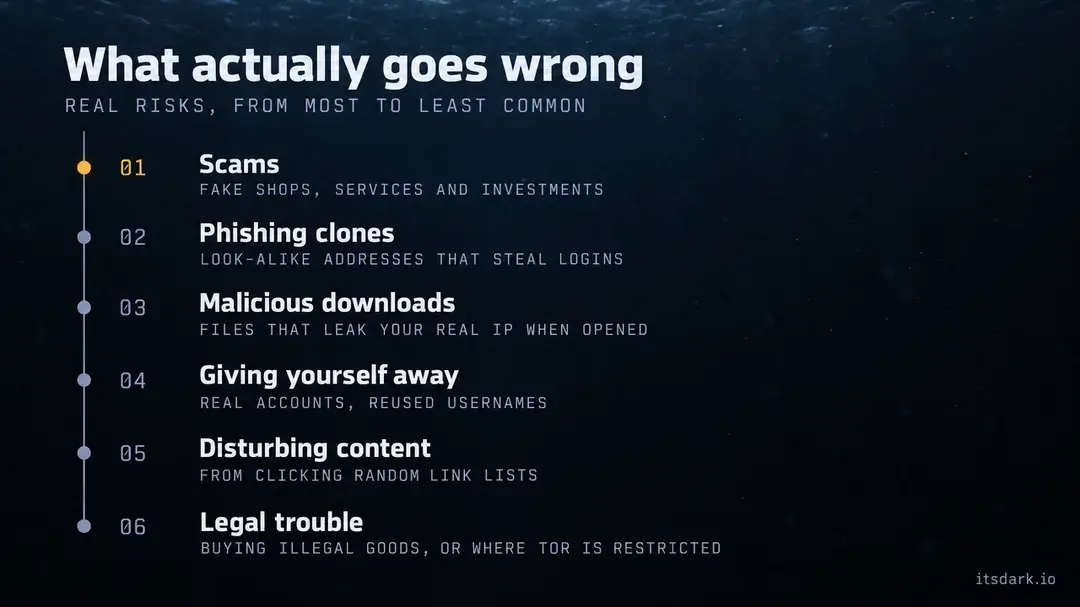
That distinction matters, because the most frightening stories about the dark web usually describe the wrong risk. You are very unlikely to be hacked simply by loading an onion page in an up-to-date Tor Browser. If you go looking for things you shouldn’t, though, you are quite likely to be scammed. Here are the real risks, roughly from most to least common.
- Scams. Fake shops, fake services, fake “investment” schemes and fakes of every other kind. This is the risk that catches the most people, and it is almost completely avoidable if you don’t send money to strangers you can’t identify.
- Phishing clones. Copies of genuine onion sites with an address that differs by a few characters, built to steal passwords and payments. The fix is to bookmark verified addresses.
- Malicious downloads. Files that contain malware or, more subtly, connect to the internet outside Tor when opened, revealing your real IP address. PDFs and Word documents are typical offenders.
- Giving yourself away. Logging into real accounts, reusing a username you use elsewhere or mentioning where you live. Tor protects your connection, not your habits.
- Seeing things you can’t unsee. Some material on the dark web is truly disturbing, and people end up finding it by clicking random links from unvetted lists.
- Legal trouble. Mostly a risk for people who buy or download illegal material, or who live in a country that restricts Tor.
What about the fear that the moment you connect, hackers or the government will be inside your computer? Attacks that exploit browser bugs to target Tor users do happen, but they are rare, they have usually been aimed at particular illegal websites, and they depend on bugs that Tor Browser updates fix. Keeping Tor Browser up to date and using a higher security level closes most of that door. The EFF’s Surveillance Self-Defense guides are a good next read on staying safe online in general.
LANTERN (Group block, class
lantern)Five habits that prevent most problems
- Download Tor Browser only from torproject.org, and keep it up to date.
- Get onion addresses from the organisation’s own website, never from a random list, and bookmark them once verified.
- Never send money or personal details to anyone you can’t identify.
- Don’t open downloaded files while you’re connected to the internet.
- If a page shows you something illegal, close it and don’t save anything.
A complete ranking of the risks, including how likely each one is and how serious the consequences are, is in Is the Dark Web Safe? An Honest Risk Map.
How people access it safely
This section isn’t a guide to finding hidden websites. It covers the choices that separate a careful Tor user from a careless one. For the full beginner’s walkthrough, see Tor Browser Explained for Total Beginners.
Get the real software. Tor Browser is free, and the only place to download it is torproject.org. Every year, fake “Tor Browsers” carrying spyware and crypto-stealers turn up in app stores and on download sites. If you got it anywhere other than torproject.org, delete it.
On phones, use the official apps. On Android, Tor Browser is published by the Tor Project itself. On iPhone, the Tor Project recommends Onion Browser. Any other app in the store that claims to be “Tor” deserves suspicion.
Turn the security level up. Tor Browser has three security levels, called Standard, Safer and Safest. Safer switches off some risky website features. Safest switches off JavaScript completely. Some sites don’t work on Safest, which is exactly the point on unfamiliar onion sites.
Don’t customise it. Adding extensions, greatly changing the window size or adjusting settings makes your browser look different from everyone else’s, and looking different is the very thing you don’t want on Tor.
Keep your identities separate. Only log into your regular accounts when you actually mean to, and don’t reuse the usernames, email addresses or distinctive writing habits you use elsewhere.
Don’t torrent over Tor. It is slow, it puts a strain on volunteer relays, and file-sharing clients are well known for leaking your real IP address.
Use bridges if Tor is blocked. If you are somewhere that blocks Tor, Tor Browser’s connection settings can route you through bridges, relays that are not publicly listed. One bridge type, Snowflake, disguises your connection as a video call.
Consider Tails for high-risk work. Tails is a complete operating system that runs from a USB stick, routes everything through Tor and erases everything when you shut it down. Journalists and activists use it when the stakes are high. Tails has been developed under the Tor Project since the two merged in 2024.
A frequent question is whether you also need a VPN. For most people, no. The Tor Project doesn’t recommend one by default, because it means trusting another company without improving the protections Tor already provides. There are some specific situations where it helps, and we cover them in the Tor Browser guide.
Five myths in brief
We check twelve of these in full in Dark Web Myths vs Reality. Here are the five that come up most often.
“The dark web is 90% of the internet”
Myth Meter says Movie myth. This myth comes from the iceberg image and confuses two separate things. The deep web (everything search engines can’t index) does make up most of the internet, since it includes every inbox, bank account and private database. The dark web is only a tiny portion of that. Historically, onion traffic has accounted for a few per cent of Tor’s traffic, and Tor itself is a small part of global internet traffic.
“Only criminals use the dark web”
Myth Meter says Movie myth. Criminals use it, but so do the BBC, the Tor Project, whistleblowers, people in censored countries and the more than a million people a month who were reaching Facebook over Tor by 2016. Most people who use Tor never visit an onion site at all.
“You get hacked the moment you visit”
Myth Meter says Movie myth. Just loading a page in an up-to-date Tor Browser is low risk, especially on the Safer or Safest security settings. People get hurt by the files they download, the things they type and the people they pay, not by visiting websites.
“Tor makes you completely anonymous”
Myth Meter says Half-true. Tor is very good at hiding your IP address from the websites you visit and hiding your browsing from your internet provider. It cannot, however, stop you identifying yourself by logging in, reusing a username or opening a file that connects outside Tor. A powerful observer who can watch both ends of a connection at once also has a better chance of identifying you than one who can’t. Tor is a powerful tool, not a magic cloak.
“The US government built Tor”
Myth Meter says Half-true. Onion routing was developed at the US Naval Research Laboratory in the mid-1990s with government funding. Tor itself was launched in 2002 by researchers including Roger Dingledine and Nick Mathewson. Its code was made public, and the Tor Project became an independent nonprofit in 2006. It still receives some government research grants alongside donations, and it publishes its finances every year. Because the code is open for anyone to examine, the “secret backdoor” theories haven’t held up.
FAQ
(Use the Rank Math FAQ block for this section so the schema is generated.)
What is the difference between the dark web and the deep web?
The deep web is everything search engines don’t index, such as your email, banking details and files stored in the cloud. You use it every day with a standard web browser. The dark web is a small part of the deep web, made up of sites that need special software such as Tor and that hide where they are hosted.
Is it possible to access the dark web using Chrome or Safari?
Not directly. Ordinary browsers can’t open .onion addresses. Some websites act as “gateways” that show onion pages in a normal browser, but they strip away the anonymity that is the whole reason for using Tor, and the gateway operator can see everything you do. Tor Browser is the safest choice.
Is it against the law just to look at the dark web?
Not in most countries. In the United States, the United Kingdom, Canada, Australia and most of Europe, it is legal to use Tor and visit onion sites. Ordinary laws still apply to what you do there, and a few countries, including China, Iran and Russia, block or restrict Tor. This is general information, not legal advice.
Is a VPN necessary to use Tor?
Usually not. Tor already hides your IP address from the websites you visit. A VPN adds another company that can see your traffic and doesn’t make Tor any more secure. Some people use one to hide the fact that they’re using Tor from their internet provider, but the bridges built into Tor Browser do that job too.
Can the police track people on the dark web?
Sometimes. Tor makes tracking much harder, but people are regularly identified through mistakes such as reused usernames, real email addresses, shipping details, payment records or malware. Police have also taken over and run criminal websites to collect evidence. Tor protects the connection, but it can’t protect a careless user.
How big is the dark web?
Smaller than most people think. Tor Metrics has recorded hundreds of thousands of unique onion addresses, but many of them belong to file-sharing tools, chat apps and temporary test servers rather than websites. The number of real, regularly visited onion sites is much lower, and traffic to onion services is only a few per cent of Tor’s total.
Why are onion addresses so long and random?
Because they’re created from each site’s cryptographic public key. A current (v3) address is 56 characters long and proves you’re connected to the right server without needing a certificate authority. The drawback is that the addresses are impossible to remember, which makes it easy for scammers to create look-alikes.
Has my personal information been found on the dark web?
Possibly, if any service you use has suffered a data breach. Stolen data is often traded on dark web forums. You don’t need to go there to check. Free services such as Have I Been Pwned show whether your email address has appeared in known breaches. If it has, change that password, stop reusing it anywhere else and turn on two-factor authentication.
Sources
- The Tor Project, About Tor and its history
- Tor Project Community, How onion services work
- Tor Browser Manual, Security settings and Bridges
- Tor Metrics, Users, Servers and Onion services
- Tor Metrics, Events timeline for Iran
- Tor Project Blog, Onion service v2 deprecation timeline
- Tor Project Blog, Tor Project and Tails join forces (September 2024)
- BBC News, BBC News launches “dark web” Tor mirror (October 2019)
- The New York Times, The New York Times as a Tor onion service (2017, updated March 2025)
- PCWorld, ProPublica joins the dark web with an onion version of its site (January 2016)
- Nextgov, A million people now access Facebook on the dark web every month (April 2016)
- EFF, Surveillance Self-Defense
- Freedom of the Press Foundation, SecureDrop
- Biddle, England, Peinado and Willman, The Darknet and the Future of Content Distribution, Microsoft Research, 2002
- Have I Been Pwned